Where did your Claude Code tokens go?
ContextGuard reads the session transcripts Claude Code already keeps on your disk and shows cost per session, cache-hit rate, and where tokens leak. No signup, no upload — the CLI never phones home unless you ask it to.
cargo install --git https://github.com/ChevvyOkK/contextguard contextguardRequires Rust and Cargo.
$ ▊
16 sessions
estimated total$415.96
cache hit rate 99%
What does an hour of Claude Code actually cost?
Spend is dominated by how much context each request carries, not by how much the model writes back. Move the sliders to your own situation.
Estimated monthly spend
$478 – $776
The range is how much work an hour produces — the 25th to 75th percentile of requests per active hour across the measured sessions.
Calibrated on the author's own transcripts: 23 sessions, 44 active hours, over 29 days. One person's usage, not a survey — the sliders are there because yours will differ. Priced at Anthropic's published API rates as of 2026-08-11; a Claude subscription bills differently.
The six things it looks for
Each one is measured against your own sessions and priced from your own token counts, not read off a checklist of generic advice.
Cache churn
Context rewritten into the cache instead of read from it. Writing costs 12.5x what reading does, so a session that keeps invalidating its prefix pays for the same tokens over and over.
Repeated file reads
The same file pulled into context several times in one session. Reports the path, the count, and what the extra reads cost.
CLAUDE.md bloat
CLAUDE.md is resent with every request, so its cost is its size multiplied by your request volume. The length of the file alone never tells you that number.
Burn-rate spikes
Sessions spending far faster per minute than your own baseline, compared against your distribution rather than a fixed threshold.
Unbounded context growth
Context climbing turn after turn with no compaction. Reports the turn where the growth stopped paying for itself.
Model mismatch
Opus answering turns that only made straightforward edits. Opus lists at 5x Sonnet across every token category.
CLI
Audits every local session: cost breakdown, cache efficiency, most expensive sessions, CLAUDE.md bloat check.
cargo install --git https://github.com/ChevvyOkK/contextguard contextguardPlugin
Actively cuts waste: truncates noisy Bash output, caps unbounded Grep results. Never blocks a call.
/plugin marketplace add ChevvyOkK/contextguard-pluginDashboard
Opt-in team view. Push one aggregated row per day — never code, prompts, or file paths.
contextguard --pushSee it before you sign up
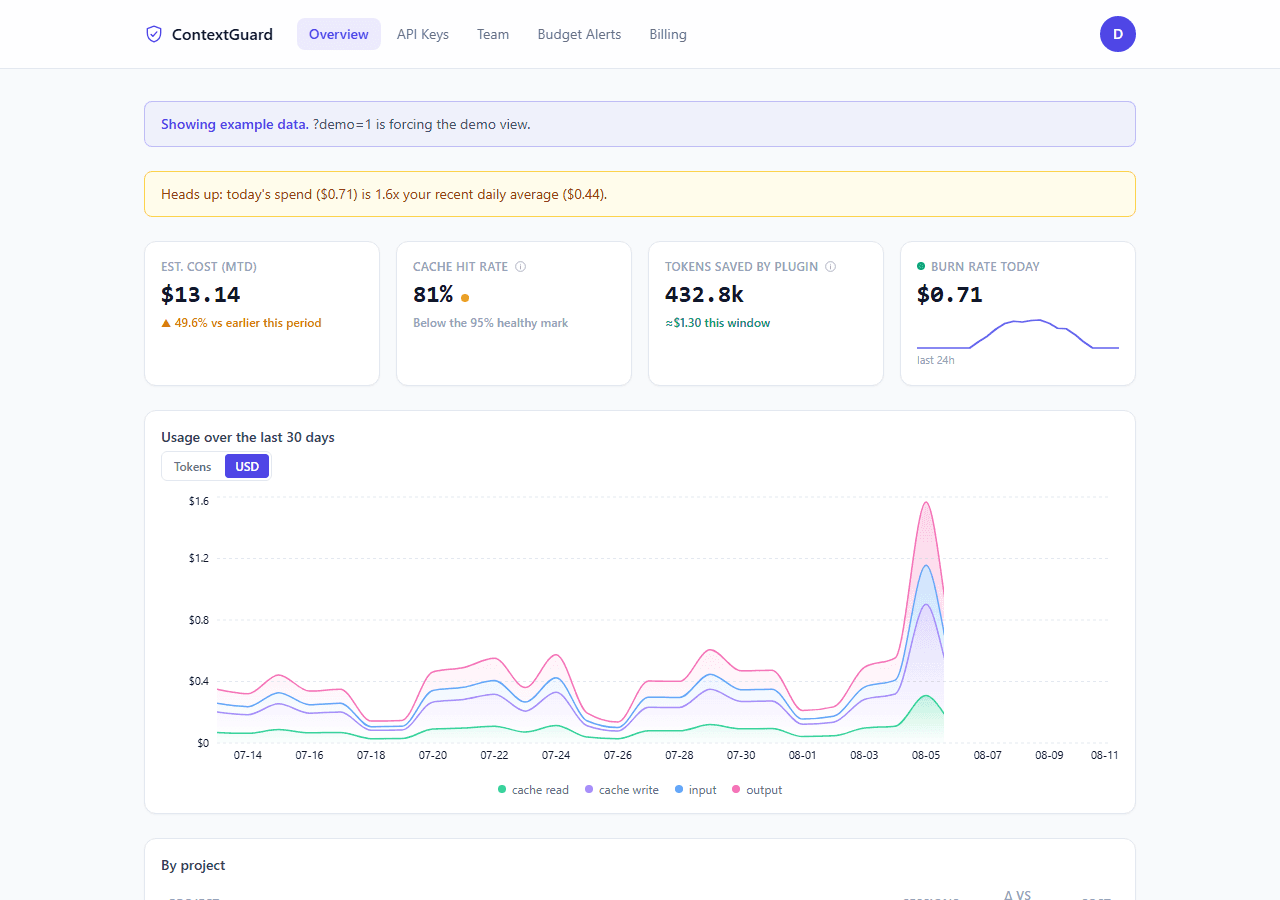
The exact dashboard you'd get — shown here with the same example dataset it falls back to for a brand-new team, so you can see what it looks like before pushing your first snapshot.
Simple pricing
Start free. Upgrade when the team dashboard matters.
Free
$0/mo
- Full CLI — context audit, CLAUDE.md autofix, git-cost by branch/PR, local budget checks
- Plugin — trims noisy output live, warns on a stuck agent, never blocks by default
- Browser transcript analyzer, no install needed
- 50 daily dashboard snapshots, 1 team seat
Pro
$12/mo
- Unlimited daily dashboard snapshots
- Team budget alerts — Slack/Discord webhook when spend crosses your threshold
- 14-day free trial, no card required
Team
Contact us
- Multi-seat team dashboard
- Pricing based on team size
- Centralized token usage across your org
What it never does
Never reads or uploads your code or conversation content — it parses only the usage totals inside each transcript line.
No network call at all unless you pass --push. The CLI, the browser analyzer on this page, and the plugin all run entirely offline by default.
Cost figures are estimates based on published API rates, not a live price feed or an invoice.
Try it right now — no install
Drop a .jsonl transcript from ~/.claude/projects/ and get your report in the browser. Check the Network tab — nothing is sent.
Don't have a .jsonl file handy? .
FAQ
Where does my data live?
On your own disk. Claude Code already writes session transcripts to ~/.claude/projects/, and the CLI (and the analyzer on this page) read them locally. Nothing is uploaded unless you explicitly run with --push.
What exactly does --push send?
One row per calendar day covered by your local sessions: token counts by category, session count, estimated cost, and the plugin's tokens-saved figure for that day. Never code, prompts, tool names, or file paths — see the contextguard-api repo for the exact schema this is validated against.
How accurate are the cost estimates?
They're based on published Anthropic per-token rates, applied to the real usage totals in your transcripts. That's an estimate for spotting trends and waste, not an invoice — actual billing depends on your plan.
Which OSes are supported?
macOS (Intel and Apple Silicon), Linux (x86_64 and ARM), and Windows. Cross-compiled binaries are published to GitHub Releases on every tagged version — v0.1.0 is up now. cargo install --git and building from source both work too.
Do I need an account to use ContextGuard?
No. The CLI, the plugin, and the transcript analyzer on this page all work with zero signup. An account is only needed if you want the hosted team dashboard below — the thing --push sends data to.